
For many years, I have used backup software made called Retrospect Backup.
As an aside, backing up your computer files is very important. These days we store many things on computers – important documents, irreplaceable photographs, emails, software licences, and so on. The originals are increasingly in the cloud somewhere, but not always. You should always have a strategy for what to do if your laptop hard drive dies, you are infected with some ransomware that locks you out of your files, or whatever it is.
You can always back up to files on internal / external hard disks, optical media like DVDs, and even tape drives (some of you will remember them, the de facto backup location about 30-40 years ago, but still trusted by some large enterprises). Starting in Retrospect 11 (2016), they introduced cloud backup. Cloud backup lets you back up to Google Drive, Dropbox, etc. In 2017 they added Backblaze B2 to this list, which I have used ever since for an additional copy of my backups.
However, I love self-hosting software, and I was wanting to self-host a storage system compatible with Amazon S3. Amazon S3 is both the cloud storage service that is part of the Amazon AWS suite of tools, and a standard that other storage providers can use to allow software to connect, upload, download, delete, etc. data. There are a number of tools you can use to create your own storage system that uses the s3 commands to access that storage. Retrospect cloud storage has supported S3 and s3-compatible storage since 2016.
Back in 2023, when I first had this idea, I experimented with some software called MinIO. Sadly, they have nuked their open source product. It will no longer receive updates, even to fix critical security flaws. They want to steer everyone onto their paid service where you pay them to store their files. I'm very glad I did not ever use their software in production.
Instead, I have managed to get s3-compatible storage set up with some software called seaweedfs. It is fully open-source.
The question, then, is how to create my Retrospect backup set to save data to my home storage system.
If you look at their documentation, you’ll see that it always assumes that you’re actually using S3 itself, and not an s3-compatible system. There are all kinds of cloud systems documented, but they either blur out what you put in the “create new backup set” window, or use Amazon S3 paths etc.
So: What to do? I had my seaweedfs system accessed through a reverse proxy, so that you don't have to worry about service ports, you simply have your s3-compatible storage at (say) https://s3.example.com. Here’s the question: What goes in the boxes in Retrospect?
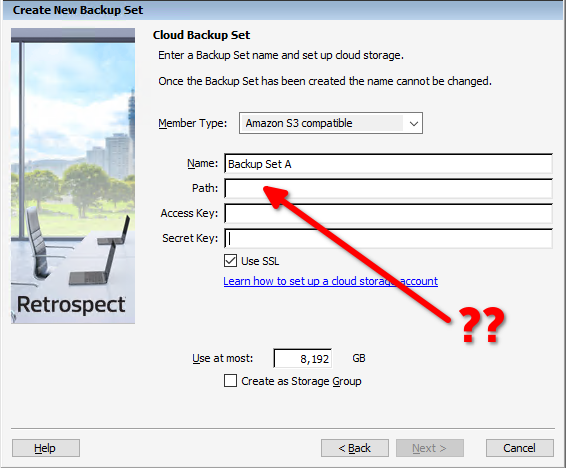
The access key and secret key are simple. They are like username and password, and you’d set that up in your chosen s3-compatible system. But what goes in the path?
I tried lots of things. With or without protocol (https://s3.example.com, or just s3.example.com)? Does there need to be a path on the end (s3.example.com/bucket-name)? Is there a subdomain on the beginning (region.s3.example.com)?
Their documentation says to put s3.amazonaws.com. It turns out that this does work if you’re using Amazon S3 because Retrospect has that domain hard-coded so that it knows how to connect to it. But if you put your own storage domain in there, s3.example.com, Retrospect will fail to connect to it.
You need the port number. Yes, I know there's a box there to tick “Use SSL” which should automatically tell it to use port 443 (the standard port for https web traffic), but it won’t assume that. Even if you're using good old port 443 / https to connect, you have to tell it, and you have to tell it by giving the port number (:443) not the protocol (https://).
So put in s3.example.com:443, and it will all work.
Also, just be aware that Retrospect seems to have a limit on how long a password will work. If you make a really unbreakable password for your s3 access rules (something like this: tr -dc 'A-Za-z0-9/_+=.-' </dev/urandom | head -c 48), Retrospect may say that the password is incorrect. At least when I got that far I was past the less helpful “Host not found or network unavailable, error -1116 (can’t access network volume)”, and knew I just had to solve why I couldn’t connect.
This was extremely frustrating to solve, because their documentation did not point me in the right direction. Hopefully this will help others too.
Recent comments